1.5×
Learning by doing
Across 225 studies of college science and math courses, students in lecture-only classes were 1.5 times more likely to fail as students who worked through problems actively.
Build printable, step-by-step, child-centric plans tailored to your child's interests. Collaborate with other families. StrewHub hosts a portfolio of your child's learning journey and maps it to your regulatory needs.
Pre-orders open soon · All your children included · Ages 5 to 16
Why it works
Researchers have measured the benefits, many times.
1.5×
Across 225 studies of college science and math courses, students in lecture-only classes were 1.5 times more likely to fail as students who worked through problems actively.
28
A review of 28 studies found that people who prepared to teach something learned it better than people who studied it for a test, and that actually teaching it afterwards helped more still.
18 min
In US elementary schools, grades K–3 average about 18 minutes of science a day, compared to 89 for reading. Only 55% of elementary science classes do hands-on work at least once a week, while 88% hear the teacher explain ideas to the whole class.
We all stand on the shoulders of giants. Your child follows printed plans to do or make something real. They write notes knowing they will help the kids who come after them. Once you review and accept them, these notes improve the plans for everyone else: teaching the next kid is built in.
How it works
For younger children, the experience can be entirely screen-free. Making happens by hand, with ink, paper, and real materials. Older children can be given more autonomy to plan media-rich courses and projects using resources and tools like IDEs, AI, MOOCs, books, and documentaries, etc.
Start from a plan in the library, from your own words, your child's words, a sketch, or from a whole month of learning outcomes worked backwards. Planning help offers ideas when you ask, and StrewHub's checks show what’s still missing.
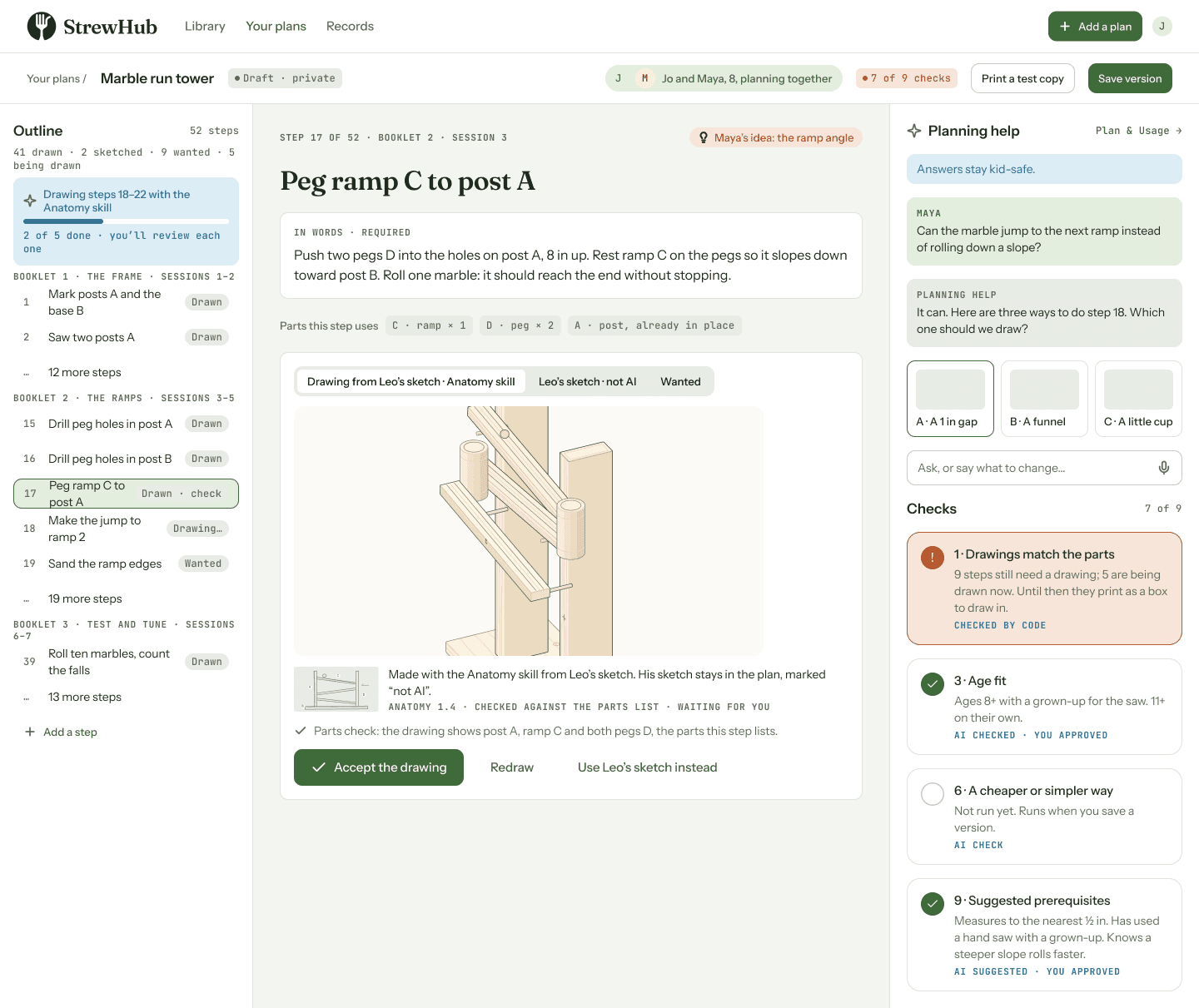
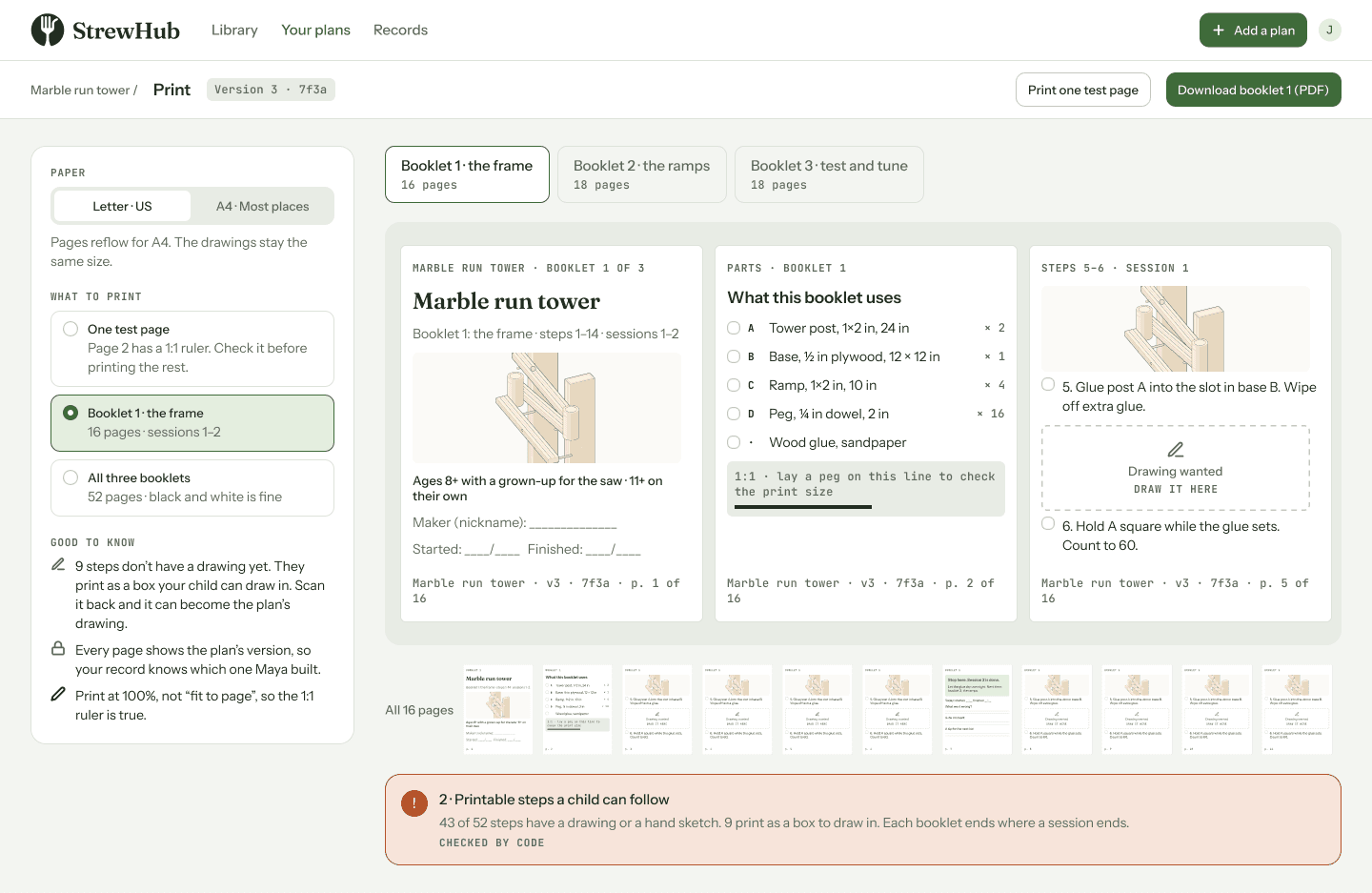
One drawing per step, every piece lettered and measured. A big build splits into booklets that end where a session ends, on Letter or A4, in black and white. A step still waiting for a drawing prints as a box your child can draw in.
They build, test and fix. On the page they write when they started and finished, what went wrong, the A-ha moments and any tips for the next kid. For a child who can’t write yet, you write it for them.
Snap a photograph of the page, or record a voice note with your phone. StrewHub reads the handwriting and files it under the session, and you check it before it’s saved. A good tip becomes a suggested change to the plan.
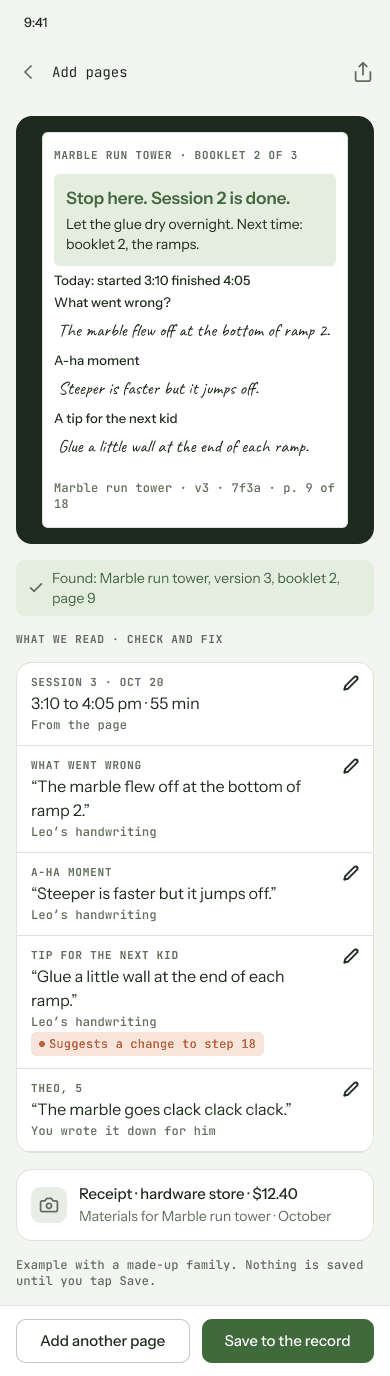
Example screens with a made-up family. Real plans from the first families replace them as they’re made.
What your child holds
Every piece is lettered and every size is on the drawing, so your child can follow it without asking. Small plans fit on a page; big ones print as booklets.
StrewHub plan · Birdhouse · Version 4
Ages 8+ · 3 sessions of 45 min · One 1×6 board, 6 ft (¾ × 5½ in actual)
What to get
Tools
Cut list
1. Measure and mark
Measure 15 in from the square end of the board and draw a line across it with the square. Write D on the piece.
2. Cut the pieces
With a grown-up
Clamp the board and saw just outside the line. Measure the next piece from the fresh end and repeat: B 11 in, B 11 in, C 9¾ in, E 8½ in, A 4 in. Cut the slope on both B pieces (11 in on one edge, 10 in on the other) and snip A’s corners so rain drains.
3. Drill the door hole
With a grown-up
On C, mark a point 7¾ in up from the bottom and centred across. Drill a 1½ in hole with a spade bit, with scrap wood underneath.
4. Build the box
Nail C to the front edges of both B pieces: three nails into the left B, and only one at the top and one at the bottom of the right B. Slide A in ¼ in up from the bottom and nail it through the left B and C.
5. Add the back and roof
Nail D to the back edges: three nails into the left B, and one at the top of the right B so it can swing open. Nail E on top, tight against D.
6. Hang it up
With a grown-up
Screw D to a post or fence 5 ft up, with the hole facing an open field and away from the wind. To clean it each fall, pull the bottom nail on the right side and swing it open.
What went wrong?
A-ha moment
A tip for the next kid
Circle any drawing that was hard to follow. Your tip helps make it better for the next kid.
Nine checks
Each version of a plan runs the same nine checks, and each check says who did it: StrewHub, AI, the families who built it, or you.
Every drawing is checked against the parts list, so piece C is really piece C.
One action and one drawing per step, and booklets that end where a session ends.
Who it suits, and which steps need a grown-up.
What your child does alone, what needs you, and how much of your time it takes.
A shopping list with prices, and how long it really took families.
Things you may already own, and an easier version to try first.
Books, guides and videos, with the minute to start from.
Your sketches and notes, marked “not AI” and never rewritten by AI.
What your child should already know or be able to do, and the plans that get them there.
The library
Plans get better each time they're used. Your child’s tip for the next kid, written on the page, becomes a change you can offer back.
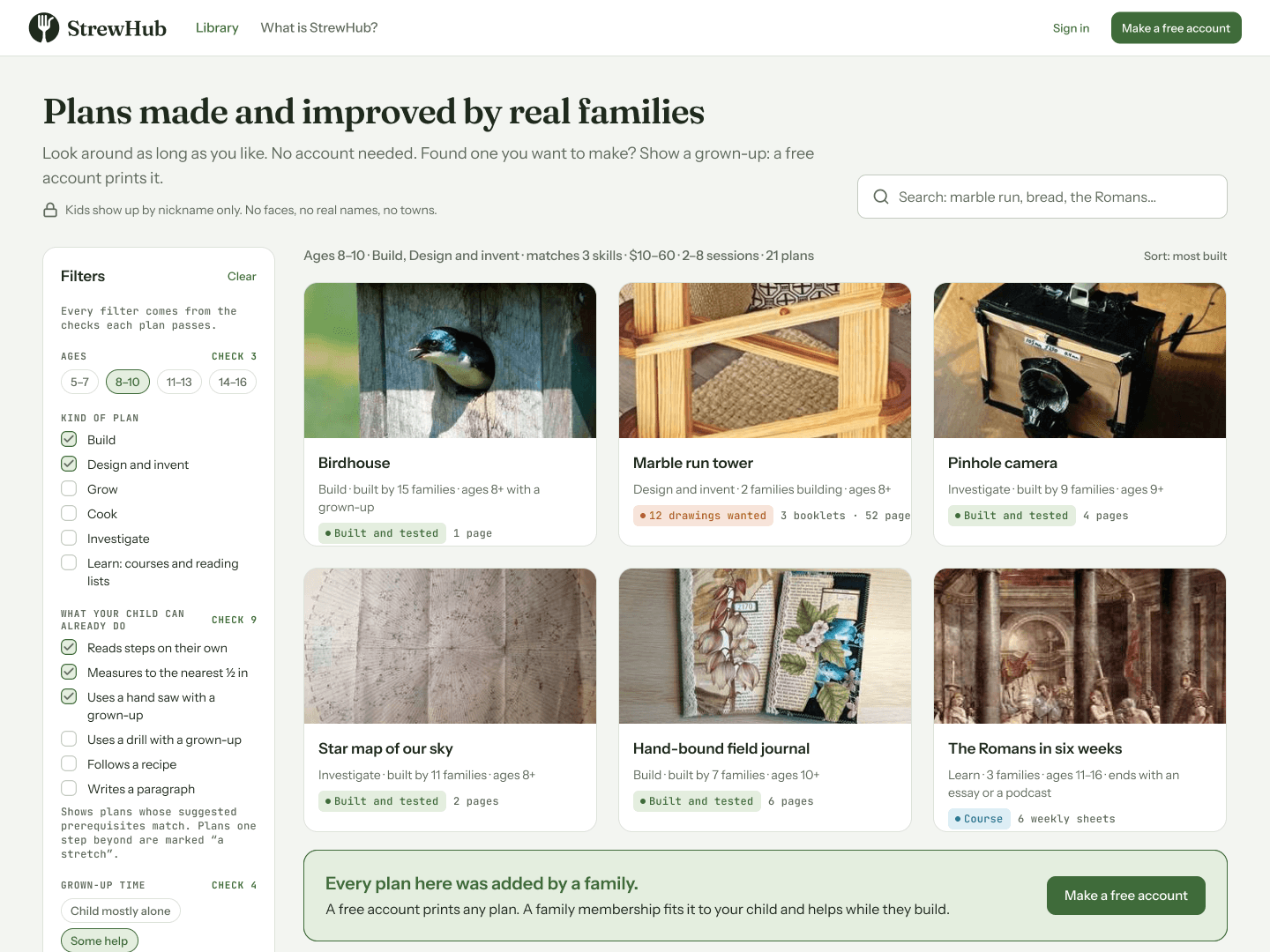
Learning journeys
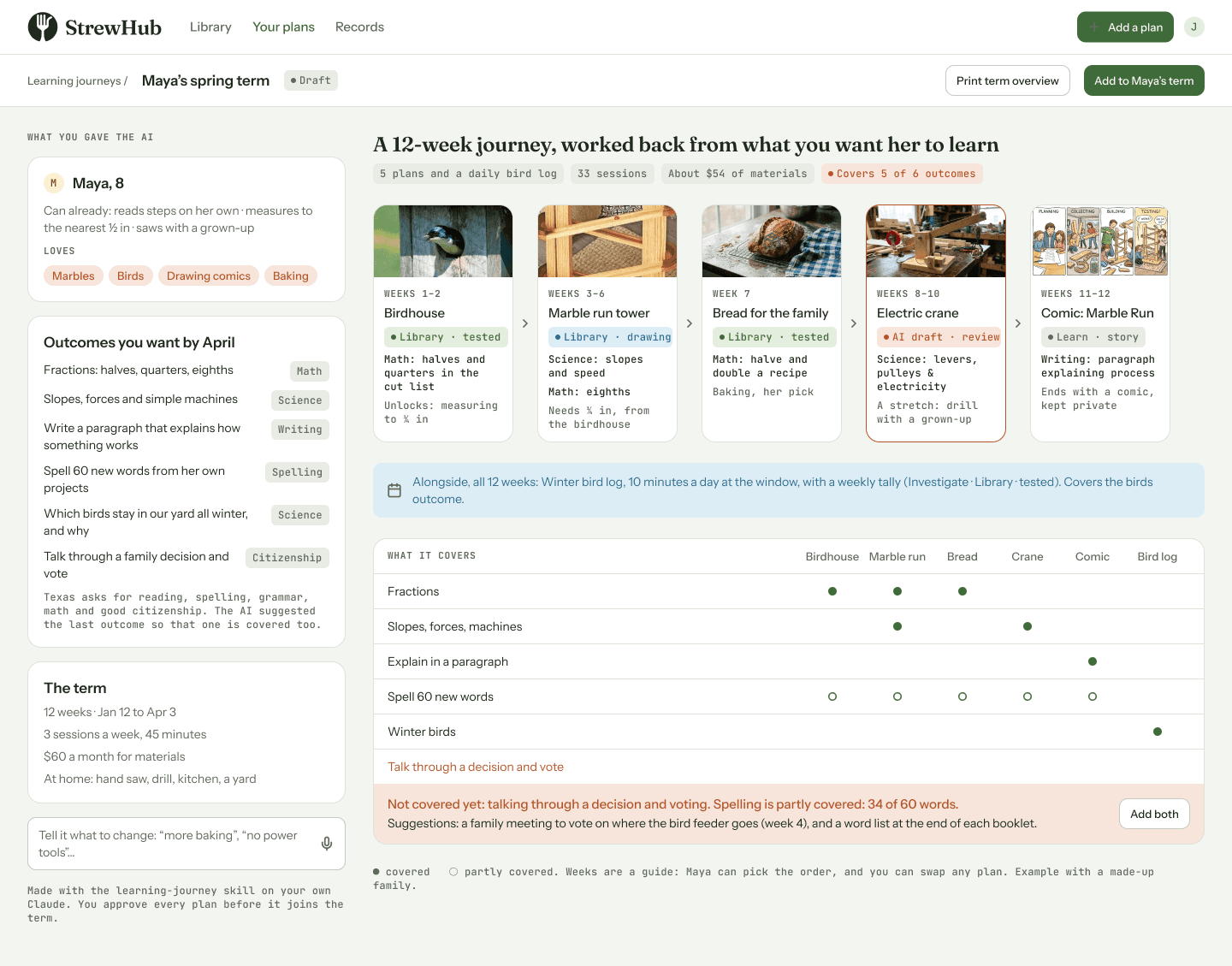
Tell StrewHub what you want your child to learn and what they love. It picks tested plans from the library, drafts the missing ones, and shows you what’s covered and what isn't.
The portfolio
As an example, Florida asks homeschooling families for a dated log of activities, the titles of reading materials, and samples of the child’s work, plus a yearly evaluation. StrewHub keeps all of it from the pages you photograph.
Home education portfolio · 2026–27
Log of educational activities
| Date | What we did | Time | Subjects |
|---|---|---|---|
| Oct 6 | Birdhouse, session 1: measured the board, marked and cut piece D. | 45 min | Math |
| Oct 8 | Birdhouse, session 2: cut the sides, front, roof and floor. First wall came out ¼ in short; re-measured and cut a new one. | 45 min | Math · Practical arts |
| Oct 13 | Birdhouse, session 3: drilled the 1½ in door hole, nailed the box together, hung it on the fence post. | 45 min | Science · Practical arts |
Reading materials and resources
Samples of work (your photos go here; drawings stand in for this example)
“I learned to measure twice, because my first wall came out too short.”Maya’s A-ha moment, in her writing on the plan, Oct 13
For the annual evaluation
By subject
Progress, in Maya’s words
“I can measure in quarter inches now, and I know why the hole is 1½ inches: it keeps the starlings out.”
Every entry carries the date it was captured and can be checked for changes. Download as PDF any time.
Example with a made-up family. This one follows what Florida’s law (s. 1002.41) describes; Texas asks families to file nothing.
AI, and the families who check it
Anyone can ask an AI for a birdhouse plan. What makes a plan worth following is that real kids built it, timed it, priced it and fixed what went wrong. AI does the drafting and drawing; families do the part that counts.
Kids and screens
Most plans are made by a parent and child together at one computer. After that, the work happens on paper.

Built by Bob Lyon, a Texan and homeschooling dad of three, raising his kids on a small farm in rural Uruguay. Read our story →
Founding families
Pre-orders open soon. Join the list and we’ll email you the day they do.
You’re joining early, while StrewHub is being built. You can log in, use plans and add your own from the first day. Expect some bugs and missing pieces, and help decide what we build next. Your $15 covers your first three months after launch.
From the day you join
The first 100 families also get
What $15 a month pays for
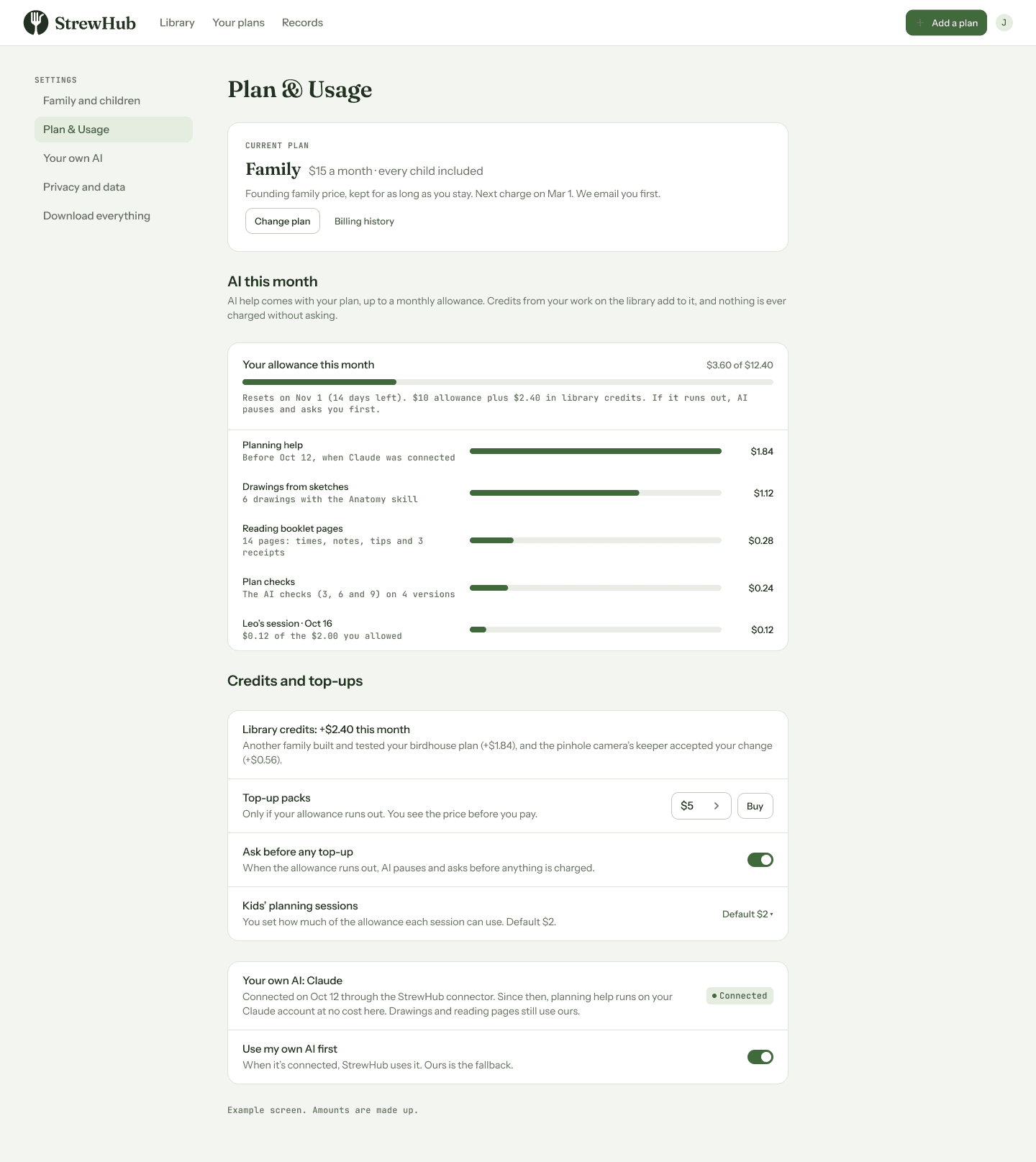
All your children included, and AI help up to a monthly allowance. Need more? You see the price before you pay.
After your three months it’s $15 a month. We email you before any charge, and you can cancel any time.
Your money back
A short note each week on how StrewHub is coming along.
Questions
Founding families use StrewHub while it’s being built. You can log in from the first day, use plans and add your own. Expect some bugs and missing pieces; you tell Bob what’s broken and what you want next, by message or on the monthly call. When the core features are steady, we launch: StrewHub opens to everyone, new families start paying, and your three months begin. We’ll email you the date at least 30 days ahead.
They pick something they want to make or a skill they want to acquire, help plan it with you, then follow a printed plan with one drawing per step: e.g. measure, cut, try, fix. On the page they write when they started and finished, what went wrong, the A-ha moments and any tips for the next kid. They never have to use a screen.
Yes. Plans are designed for ages 5 to 16. For a child who can’t write yet, you write their words on the page for them, and StrewHub notes that you wrote it down. Younger children build alongside you; older ones can run whole projects on their own.
No. Plans can be things to build, grow, cook, investigate or invent. Learning plans work like a course: a reading list, online courses and documentaries, ending in an essay, a research paper, an oral interview, a podcast or a video demo. The Romans in six weeks is one example.
A home printer helps, but a library or print shop works too. You could even use an e-ink reader, or a tablet if you want to save paper. Plans print in black and white on Letter or A4. Small plans fit on a page; big ones come as booklets that end where a session ends. Each plan comes with a shopping list and prices.
Families, with AI if you like. Start from a plan other families built and improved, write your own in your own words, or bring one you already have. You check every plan before printing, and every step shows who made it. Your own notes and sketches are never rewritten by AI.
No. StrewHub works without it: write the steps in your own words and draw them by hand. If you want help, AI comes with your membership up to a monthly allowance, and you see the price of anything more before you pay. You can also use the AI you already pay for, like Claude or ChatGPT, with StrewHub’s free skills. Either way, you approve every plan before your child sees it.
Yes, if you want them to. You start a session for one plan and choose what they can do and how much AI they can use. They sign in with a one-time code: no account, no password, no email. Nothing they change is kept until you accept it.
Only your family. If you share a plan, the public version shows the steps, drawings and tips under a family nickname: never your child’s name, face or town. Only parents can share, and children never message other children.
Yes. Anyone can read the library without an account, and a free account lets you print any plan. The $15 a month is for what makes a plan work for your child: fitting it to their age, tools and budget, help while they build, your family’s private record and learning journeys. It also keeps the library free for everyone.
All of them. One family price, every child is included.
Not yet, on purpose. Parents talk with each other on the plans themselves and on the monthly founding-family call. When there are enough families and you ask for one, we’ll add a parents-only forum. Kids never message anyone.
Not for the founding offer. We plan to apply as a TEFA vendor once StrewHub is open. StrewHub LLC is a Wyoming company, funded by the families who use it.